Print and scan from Android with Smart Printer: All Documents
Print PDF, Word, Excel, images and web pages directly over Wi-Fi or Bluetooth from your phone, including a preview step and selectable paper size and orientation. Smart Printer : All Documents, by Familia Apps Developers, is an Android utilities tool that connects mobile devices to printers without a PC or separate drivers. It includes a built-in spooler, automatic printer discovery, and a scanner that creates PDFs, aimed at students, office workers, and home users who need direct mobile output.
What does Smart Printer do?
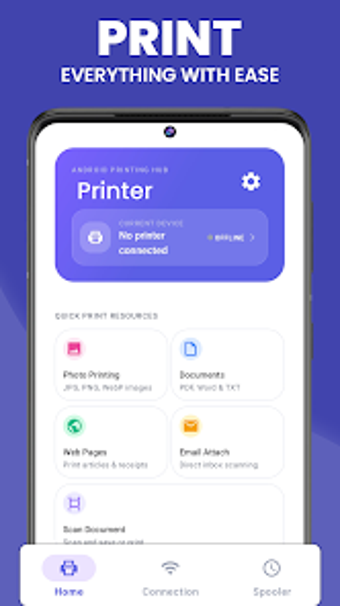
Smart Printer acts as a mobile bridge between Android devices and wireless printers: it prints PDF, DOC/DOCX, XLS/XLSX, TXT and common image formats, sends web pages and email attachments to a printer, and scans physical pages into PDF. The app also offers a document preview and configurable print settings such as number of copies, paper size, and page orientation, which support finishing print jobs without a desktop computer.
Does printing or scanning affect device performance?
The tool relies on Wi-Fi or Bluetooth for transfers and keeps active jobs in a built-in print spooler, so heavy job queues are managed inside the app rather than by the OS. Background operation and job management occur within the spooler, which reduces repeated user prompts during sequences of multiple prints. Device-level resource figures are not listed, but the spooler centralises job state and progress for ongoing tasks.
Is it safe to use on a production or sensitive device?
Smart Printer uses local wireless connections and does not require cloud uploads, so documents stay on the device during transfer. The app performs automatic printer discovery on the local network or via Bluetooth, which limits exposure to devices on the same network. The absence of cloud routing and the local preview step provide control over content before it leaves the handset.
Do I need technical knowledge to operate Smart Printer?
The app automates connection steps with automatic printer discovery and provides guided print settings, which suit non-technical users who need straightforward print-and-scan workflows. More advanced users can adjust paper size and orientation and manage active jobs with the spooler. The combination of automatic discovery and manual setting controls addresses both basic use and modest customization without requiring driver installation.
Practical mobile printing for everyday users with one clear caveat
Smart Printer serves mobile-first printing and scanning needs for students, home users, and office staff who want to avoid a PC, offering local transfers, preview, and job management. The main caveat is that network-based discovery ties operation to local Wi-Fi or Bluetooth availability, so printing outside the same network or without wireless access is not supported by the app's described workflow.